

How often should you run a robotic pool cleaner? For most pools in swim season, 2-3 full cycles per week keeps the floor, walls, and waterline spotless. Bump that to daily during pollen season or heavy leaf drop, and drop back to once a week in the cooler shoulder months. That's the short answer we give after testing 70+ robots on real pools since 2011. The longer answer depends on your trees, your swimmers, and your weather — so here's how to dial in the right schedule, and why you shouldn't just leave the robot in the pool between runs.
Key takeaways
- 2-3 cycles a week is the sweet spot for most pools in season.
- Go daily during pollen bursts, leaf drop, or heavy swimmer and dog traffic; once weekly is plenty in shoulder season.
- Don't store it in the pool: constant chlorine and UV exposure ages seals, plastics, and cables.
- Electricity is a non-issue: a full cycle costs pennies.
- Timers and apps make the right frequency automatic — set the schedule once and forget it.
How often to run a robotic pool cleaner: the quick answer
Robotic cleaners are descended from commercial machines that clean hotel pools every single day, so there's no such thing as running one "too often." The real question is how much cleaning your pool actually needs:
| Situation | How often to run it |
|---|---|
| Typical pool, swim season | 2-3 cycles per week |
| Pollen season or active leaf drop | Daily |
| Party weekend, heavy swimmer or dog use | Extra cycle right after |
| Shoulder season, pool open but quiet | 1 cycle per week |
| Pool closed for winter | Not at all — clean it, dry it, store it indoors |
One principle drives all of these numbers: frequent short cleanups beat occasional marathons. Debris that's removed within a day or two never gets the chance to decompose, stain, consume chlorine, or feed algae. A robot run three times a week is doing preventive care; a robot run every ten days is doing recovery work.
As for when to run it, any hour works — the robot doesn't care — but most owners land on overnight or early-morning cycles. The pool is finished by breakfast, yesterday's debris never sits long, and the robot isn't sharing the water with swimmers. If your household swims on a predictable schedule, set the cycle to end an hour or two before pool time and you'll step into a freshly cleaned pool every day.
Factors that change how often you should run your robot
Two identical pools a mile apart can need very different schedules. Here's what moves the number:
Trees and landscaping. A pool under oak or pine canopy needs daily cycles during drop season, ideally with an oversized basket or leaf bag. Our picks for leaf-heavy pools are built for exactly this.
Swimmer load. People shed sunscreen, body oils, and hair. A pool that hosts kids every afternoon collects visible grime faster than a quiet one — add a cycle or two in peak weeks.
Dogs. We love dogs in pools; filters don't. Pet hair and the debris dogs carry in can double a pool's cleaning demand, which is why we keep a dedicated list of robots for dogs that swim with fine filtration that actually catches hair.
Weather. Wind, storms, and monsoon dust wash debris in overnight — run a cycle after any blow. And during spring pollen bursts, an ultra-fine filter and daily runs are the difference between clear and hazy; see our picks for pollen.
Algae pressure. If your pool tends toward algae, daily cycles add scrubbing action and constant fine filtration that starve a bloom of its foothold — alongside, not instead of, proper chemistry. Balance the water first; the robot is the finisher, not the fix.
Season. The same pool might want daily runs in April for pollen, three cycles a week through July for swimmers, daily again in October for leaves, and one lap a week in the quiet stretches between. Revisit the schedule when the landscape changes, not on the calendar.

Set the schedule once: weekly timers and app control
The best frequency is the one that happens without you remembering it. That's why our favorite feature on modern robots is scheduling: weekly-timer models repeat a cycle automatically every one, two, or three days, and Wi-Fi models let you adjust the schedule, start a spot-clean, or check cycle history from your phone.
A setup we configure for customers constantly: cycles every other day at 5 a.m. through swim season, dialed up to daily during spring pollen and fall leaf drop, then down to one run a week once the water cools. That's the entire system — the robot handles the remembering, and you handle the two-minute filter rinse.
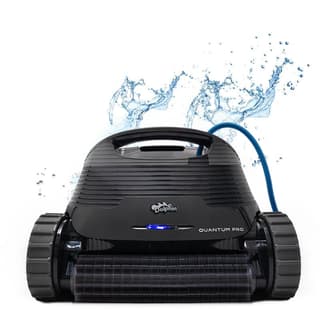
Dolphin Quantum
$1649.00
Set it to clean every day, every two days, or every three days — the Quantum handles the schedule itself, with an oversized fine-filter basket between rinses.
View Details → Free shipping · 30-day returns
Can you leave a robotic pool cleaner in the pool?
You can — nothing dramatic happens overnight — but you shouldn't make a habit of it. Pool water is a mildly hostile environment: chlorine and UV light slowly attack seals, gaskets, plastics, and cable insulation. The robots that come back to our service bench aged beyond their years are, overwhelmingly, the ones that lived in the water around the clock. Pulling the robot between cycles is the single cheapest thing you can do to stretch its life — and quality machines already last 5-8 years with that basic care.
There are three other reasons to pull it. Debris sitting in the basket keeps decomposing and feeding chlorine demand even after the cycle ends. A parked robot and its cable are obstacles for swimmers. And chemistry events are hard on equipment — always remove the robot before shocking the pool and keep it out until levels normalize.
The one exception we'll grant: leaving the robot in over a busy holiday weekend of back-to-back daily cycles is fine. It's the weeks-at-a-time habit — the robot as permanent pool furniture — that shortens lifespans.
The five-minute after-cycle routine
Here's the habit that keeps a robot healthy for years:
- Unplug the power supply before touching the cable.
- Bring the robot to the edge — most models make this easy by finishing near the wall — and lift it out by the handle, letting water drain back into the pool.
- Rinse the filters with a garden hose until the water runs clear. No pressure washers.
- Give the body and brushes a quick fresh-water rinse, especially in saltwater pools.
- Loosely coil the cable in wide loops to prevent twists and memory.
- Store it in the shade on a caddy — not baking on the pool deck. Sun is as hard on a parked robot as water is on a submerged one.
The full routine, along with seasonal care, lives in our maintenance guide. A proper storage caddy makes steps two through six almost automatic — the robot rolls to the pool, cleans, and rolls back to shade. And at season's end, give everything a thorough rinse, let the robot and cable dry completely, and store the whole kit indoors: a garage shelf beats a freezing shed, and the power supply should never winter outside.
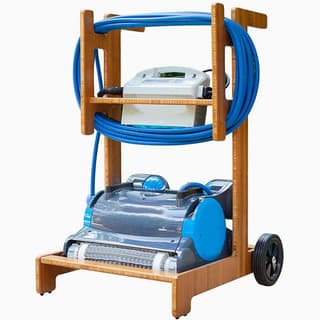
Terra Premium Caddy
$249.00
Waterproof caddy that stores and moves your Dolphin and its power supply together, with UV protection that shields the robot between cycles.
View Details → Free shipping · 30-day returns
What all those cycles cost in electricity
If you're hesitating to run the robot daily because of your power bill, don't. Most robotic cleaners draw around 150-200 watts while running — about what a desktop computer uses. A two-hour cycle consumes roughly a third of a kilowatt-hour, which works out to a few cents at typical US electric rates. Even a robot running every single day of a six-month season adds up to only a few dollars a month.
Compare that with the alternative: pushing your main pump to run extra hours for circulation-based cleaning costs far more per hour, and it still won't scrub a wall. The robot is, by a wide margin, the cheapest labor your pool will ever hire. If you want an exact figure, the label on your robot's power supply and your utility rate will get you there — but in fifteen years we've never met an owner whose robot moved the electric bill enough to notice.
A month-by-month schedule for a typical season
Debris arrives on a calendar, so the schedule should follow one. Adjust the months to your climate; the pattern holds anywhere.
Opening month. Daily cycles for the first week. A pool that has sat under a cover collects a season's worth of fine silt, and the first few runs are as much about polishing the water as removing debris — empty the filter after every single cycle here, because it will fill fast.
Spring, through pollen season. Three cycles a week, with fine or NanoFilter media loaded. Pollen is too fine for standard cartridges and it's what makes spring water look dull even when it's balanced. If your patio furniture is yellow, your filter media should be fine.
Peak summer. Two to three cycles a week, plus an extra run after any pool party or storm. Heat, sunscreen, and swimmer load all raise the debris and oil burden; running the day after heavy use keeps the water from ever looking tired.
Late summer into fall. Back up to three or more cycles a week as leaves start dropping, and switch to a leaf bag or your largest-capacity media. This is the season that decides whether you needed the Premier — a cartridge robot in a leafy yard needs emptying mid-cycle, which is nobody's idea of automation.
Closing month. One thorough final cycle after the last leaf drop and before the cover goes on. Then rinse everything, dry it fully, and store the robot indoors — the routine in our pool closing guide.
Dial in your schedule
The bottom line
Three cycles a week is the right default for most pools, adjusted up in pollen and leaf season and down in the shoulder months. What matters more than the exact number is consistency — a pool cleaned on a timer never gets far enough behind to need rescuing, which is why the robots that keep pools looking best are the ones nobody has to remember to start.
Start at three cycles a week. If you're seeing debris between runs, add a cycle; if the basket's coming up half-empty, subtract one. Adjust up for pollen and leaf season, down for shoulder months, and always pull, rinse, and shade-store the robot between runs.
Don't have your robot yet — or running an older one that can't schedule itself? Our 60-second quiz matches a cleaner with the right timer, filtration, and coverage to your exact pool, backed by free shipping, 30-day returns, and a full manufacturer warranty.
