

Looking for the reset button on your Dolphin pool cleaner? Here's the answer up front: most Dolphins don't have one. You reset a Dolphin by switching off the power supply, unplugging it for about 30 seconds, plugging it back in, and restarting the cycle — and on app models, re-pairing through myDolphin Plus if needed. That one move clears a surprising share of problems. For everything it doesn't fix, this Dolphin pool cleaner troubleshooting guide walks the same symptom-by-symptom checks our technicians use. We're a factory-authorized Dolphin dealer and have serviced these robots since 2011, so this is the real playbook.
Key takeaways
- There's no reset button: power off at the supply, unplug 30 seconds, restart — that IS the reset.
- No power? Work outward-in — outlet and GFCI first, then the supply light, then the cable connection.
- Stops mid-cycle? A packed filter is the most common cause we see. Rinse it before assuming worse.
- Won't climb? Check filter load and brush wear before blaming the robot — slick, unbalanced water fails climbers too.
- Still stuck? We're factory-authorized for Dolphin warranty service — you don't have to diagnose alone.
How to reset a Dolphin pool cleaner (there's no reset button)
Maytronics designed Dolphins to be reset from the wall, not from a button on the robot. The full reset that clears the control board:
- Switch off the power supply using its power button.
- Unplug the power supply from the outlet and leave it unplugged for about 30 seconds so it fully discharges.
- Check the cable connection where the floating cable plugs into the supply — reseat it snugly.
- Plug back in, power on, and start a cycle with the robot fully submerged.
- App models only: if the robot runs but the app misbehaves, force-close myDolphin Plus, then re-pair the robot from inside the app.
That's the whole ritual. If your Dolphin was glitching — refusing to start, ignoring the app, stopping randomly — there's a good chance it's already fixed. If not, find your symptom below. And if the robot resets fine but the same fault returns within a cycle or two, that's no longer a glitch — it's a symptom, and the sections below will run it down.
Dolphin pool cleaner not working at all? Start with power
A completely dead Dolphin is almost never a dead Dolphin — it's usually a power delivery problem, and you diagnose it from the wall inward:
- The outlet and GFCI. Pool equipment runs on GFCI-protected circuits that trip easily, especially after storms. Press the reset button on the outlet (this one does have a reset button) and test the outlet with a phone charger.
- The power supply light. With a good outlet, the supply's indicator should light when powered on. No light means the supply itself is the problem — the single most common hardware failure we replace.
- The cable connection. A floating cable that's not fully seated at the supply will act exactly like a dead robot. Unplug the supply first, then reseat the cable connector firmly.
If the supply lights up, the cable is snug, and the robot still won't wake up underwater, jump ahead to the power supply and warranty section below.

Dolphin runs but doesn't move
You can hear or feel the pump motor working, but the robot sits on the bottom like a rock. Three usual suspects, in order of likelihood:
- A jammed impeller. Leaves, hair, and pine needles wrap around the impeller shaft and stall the drive. Unplug the power supply first, then open the impeller cover per your manual and clear everything wrapped inside.
- Worn tracks or brushes. Tracks and brushes are wear items. If they're smooth, glazed, or loose after a few seasons, the robot spins without gripping — replacements restore it to new.
- A worn drive belt. On belt-driven models, a stretched belt lets the motor turn while the tracks don't. Belts are inexpensive and user-replaceable on most models.
Movement problems are a universal robot ailment, not just a Dolphin one — our guide to why your pool cleaner isn't moving walks all eight fixes in cheapest-first order.
Dolphin stops mid-cycle
When a Dolphin starts strong and quits partway through, the cause is almost always one of these:
- A full filter. This is the number-one reason we hear "my Dolphin stopped working" — a packed filter chokes water flow, the motor strains, and the robot shuts down to protect itself. Rinse cartridges or the basket until water runs clear through them. If your fine filters stay gray after rinsing, the media itself is worn out.
- Overheat protection. Dolphins shut down rather than cook their motors. Common triggers are running with a packed filter, running out of the water, or repeated jams. Let it cool, clear the cause, and restart.
- Cable interruption. A damaged spot on the cable can cut power intermittently. Inspect the jacket end to end for nicks or crush points.
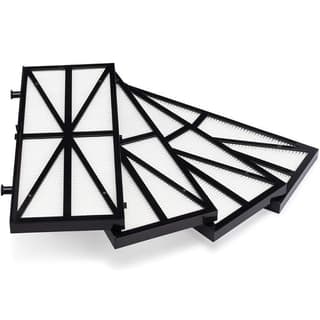
Dolphin NanoFilters
$109.00
If your fine filters no longer rinse clean, fresh ultra-fine media restores water flow — and mid-cycle shutdowns caused by choked filters usually disappear with it.
View Details → Free shipping · 30-day returns
Dolphin not climbing walls
Wall climbing is the first ability a struggling Dolphin loses, because it demands maximum suction and grip at the same time:
- Filter load. Even a half-full filter reduces the water flow that pins the robot to the wall. Climbing complaints drop dramatically with a freshly rinsed filter — check the fine filter media first.
- Worn brushes. Brushes provide wall grip. Once the working surface wears down, the robot slips backward on vertical surfaces.
- Slick walls. Here's the one owners miss — early algae film makes walls too slippery to climb, and that's a water chemistry problem, not a robot problem. If the waterline feels slimy, balance and sanitize the water before condemning the cleaner.
myDolphin Plus app won't connect
For Wi-Fi-enabled Dolphins like the Sigma, connection issues nearly always trace to the same short list:
- Power-cycle everything — the robot's power supply, your phone's Wi-Fi, and the app itself.
- Re-pair the robot from inside myDolphin Plus rather than hunting through phone Bluetooth settings.
- Use the 2.4 GHz band. Dolphin supplies connect to 2.4 GHz Wi-Fi, not 5 GHz. If your router broadcasts one merged network name, temporarily separate the bands or stand closer to the router during pairing.
- Close the distance. The Wi-Fi radio lives in the power supply, so the supply — not the robot — needs solid signal.
Remember, the app is a remote control, not the robot's brain. A Dolphin with no app connection still cleans perfectly on its built-in program.
Symptom, cause, and fix at a glance
| Symptom | Most likely cause | First fix |
|---|---|---|
| Completely dead, no lights | Tripped GFCI or dead outlet | Reset the GFCI, test the outlet, do the 30-second reset |
| Supply light on, robot lifeless | Cable connection or power supply | Reseat the cable; test with a known-good supply |
| Motor runs, robot won't drive | Jammed impeller or worn tracks | Unplug, clear the impeller, check track wear |
| Stops mid-cycle | Packed filter or overheating | Rinse filters until water runs clear, let it cool |
| Cleans floor, won't climb | Filter load, worn brushes, slick walls | Rinse filters, inspect brushes, balance the water |
| App can't find the robot | Pairing or Wi-Fi band issue | Power-cycle, re-pair, connect on 2.4 GHz |
Five habits that prevent most of these faults
Nearly every symptom above traces back to one of five omissions. Fix the habits and the troubleshooting mostly stops being necessary.
Rinse the filters after every cycle, not when you remember. Dried debris cements into media and permanently costs you suction. Thirty seconds with a hose at the end of a cycle is the highest-return habit in robot ownership.
Take the robot out of the water between runs. A robot parked in the pool full-time soaks in chlorine around the clock, which ages seals, brushes, and cable jacket far faster than the cycles themselves do. It's also how robots get caught in shock treatments.
Coil the cable in loose loops, never tight wraps. Tight coiling stresses the conductors where the cable enters the body — the single most common cause of intermittent power faults on older units.
Keep the power supply dry, shaded, and off the ground. It's the most expensive part to replace and the least protected. A caddy solves the whole problem in one purchase.
Check the brushes once a month. Worn brushes look fine from above but stop scrubbing long before they look worn out — and a robot that "isn't cleaning as well as it used to" is very often a brush problem rather than a motor one.
When it's the power supply — and when it's warranty time
Two components cause most "it's really broken" Dolphin cases: the power supply and the drive motor. The power supply is the one you can solve yourself. If the outlet is good but the supply won't light, clicks under load, or cuts out when the motors spin up, replace it — it's a plug-and-play part, no tools required.
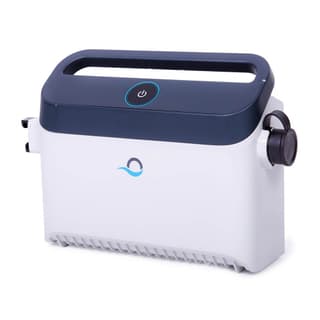
Dolphin Power Supply
$329.00 $399.00 Save 18%
The most common Dolphin hardware fix there is. A genuine Maytronics supply swaps in seconds — if your robot is dead with a good outlet, this is the odds-on repair.
View Details → Free shipping · 30-day returns
One tip before you buy anything: if you can get your hands on a known-good compatible supply — a neighbor's, or ours over the counter — a thirty-second swap test confirms the diagnosis beyond doubt.
Suspected motor or electronics trouble is different — that's warranty territory, and opening the motor unit yourself can void coverage. Most Dolphins carry 2-3 year warranties, and as a factory-authorized dealer we handle claims directly: check your coverage on our warranty information page and contact our team with your model and symptom. We'll tell you honestly whether it's a five-minute fix, a warranty claim, or — for a robot near the end of its 5-8 year lifespan — a case for replacement.
Next step
The bottom line
Four out of five Dolphin faults we're called about are a dirty filter, a debris-jammed track, a cable coiled too tightly, or a power supply that lost its outlet — and all four are free to fix in your driveway. Run the reset, work down the checks in order, and only reach for the warranty page when the symptom survives all of them.
Work top to bottom: reset first, then power, then the mechanical checks, then the table. That order resolves the overwhelming majority of Dolphin complaints without a single tool. Bookmark our full troubleshooting guide for the long version, and if your Dolphin has genuinely reached retirement age, our guide to which Dolphin is best or the 60-second Help Me Choose quiz will find its successor.
