

Why is my pool cleaner not moving? Nine times out of ten it's one of eight fixable problems — and the most common ones cost nothing. Power delivery, a tangled cable, a jammed impeller, and a packed filter account for the overwhelming majority of "dead" robots we see, and we've been servicing robotic cleaners since 2011. Work through the eight fixes below in order, cheapest first, before you spend a dollar on parts or a minute worrying about the motor. This guide applies to every brand we sell; Dolphin owners can also use our Dolphin-specific troubleshooting guide alongside it.

Key takeaways
- Start free: a 30-second power-cycle and a GFCI check solve a surprising share of cases.
- The classic jam: leaves and hair wrapped around the impeller stop more robots than any motor failure.
- Filters matter: a packed filter triggers protective shutdowns that look exactly like a dead robot.
- Always unplug first before putting fingers near the impeller or brushes.
- Age decides: robots under 5 years are usually worth repairing; past 7-8, replacement math wins.
The 8 fixes, in the order we'd try them
Here's the full checklist, ordered from free-and-instant to worth-a-service-call. Each gets detail below.
- Power-cycle for 30 seconds — off at the supply, unplugged, then restart.
- Check the GFCI and outlet — tripped breakers imitate dead robots perfectly.
- Read the power supply indicator — no light with a good outlet means the supply is the story.
- Untangle and inspect the cable — including the swivel, kinks, and jacket damage.
- Clear the impeller — the classic jam. Power off first, always.
- Rinse the filter — packed media triggers protective shutoffs.
- Check tracks and brushes — wear and jammed pebbles kill traction.
- Test briefly out of the water — a few seconds only, to watch what moves.
| What you're seeing | Start at fix |
|---|---|
| No lights anywhere, totally dead | 1-3 |
| Powers on but never starts | 4-6 |
| Hums or vibrates, doesn't drive | 5, 7 |
| Moves weakly or quits early | 6-7 |
Fixes 1-3: Rule out power before touching the robot
Fix 1 — the 30-second reset. Switch the power supply off, unplug it from the wall, count to thirty, plug it back in, and restart. Control boards glitch; capacitors hold charge; a full power-cycle clears both. This is the entire "reset" procedure for most robotic cleaners — there's no hidden button.
Fix 2 — the GFCI and outlet. Pool robots live on GFCI-protected circuits, and GFCIs trip from storms, moisture, and age. Press the outlet's reset button, check the breaker panel, and verify the outlet actually works with a phone charger. This free fix ends a remarkable number of service calls before they start.
Fix 3 — the power supply light. With a confirmed-good outlet, the supply's indicator should light. No light, no robot — the supply itself has failed, and it's the most commonly replaced part in this hobby. If the light is on, also reseat the floating cable's connector at the supply (with everything powered off) — a half-seated plug behaves exactly like a dead machine.
Fix 4: Untangle and inspect the cable
A badly coiled cable does two things: it physically anchors the robot in one spot, and internal damage from repeated kinking can interrupt power. Pull the robot out, lay the entire cable straight on the deck, and undo every loop. Check that the swivel (if your model has one) spins freely — a seized swivel is why the cable re-tangles itself every cycle. Then run the jacket through your hands end to end feeling for nicks, flat crush points, or exposed conductor. Cable damage is repairable at a service center, but it's not a DIY splice job on a submerged electrical device.
Prevention is easy: only feed in enough cable to reach the far end of the pool plus a few feet, and straighten it weekly.
Fix 5: Clear the impeller — the classic jam
If the robot hums, vibrates, or runs its pump but won't drive anywhere, you've probably found the culprit already. Leaves, twigs, pebbles, and above all hair and string wrap around the impeller shaft until it stalls. The robot then either strains in place or shuts down entirely.
- Unplug the power supply. Not just off — unplugged. Never put fingers near an impeller on a connected robot.
- Open the impeller access cover (check your manual — usually a few screws at the outlet top).
- Remove everything wrapped around the shaft. Long-haired swimmers and shedding dogs make this a regular chore.
- Spin the impeller by hand — it should turn freely with a slight motor resistance.
- Reassemble, reconnect, and test.
In our service experience this single fix revives more "dead" robots than every other repair combined.

Fix 6: Rinse a packed filter
A loaded filter chokes water flow through the robot. Suction drops, motors strain, and most modern robots respond by shutting down to protect themselves — which owners read as "it stopped moving." Pull the cartridges or basket and hose them down until water runs freely through the media. If fine filters stay gray or brown after a thorough rinse, the media is at end of life and due for replacement.
While you're in there, run the robot's next cycle and watch: a robot that moves fine with a clean filter but quits when it loads up isn't broken at all — it just needs its filters emptied more often. Our guide on how often to run your robot helps you find the cadence that keeps filters ahead of the debris.
Fixes 7-8: Tracks, brushes, and the out-of-water test
Fix 7 — tracks and brushes. Traction parts wear like tires. Inspect tracks for smooth, glazed spots, cracks, or looseness, and brushes for worn-down working surfaces. Also hunt for the sneaky version: a pebble or acorn jammed in the track path or wheel hub that locks one side and makes the robot spin in circles or freeze. Wear parts are inexpensive and designed for owner replacement.
Fix 8 — the brief out-of-water test. With the robot on the deck and your manual's blessing, power it on for a few seconds only — robot motors are water-cooled, and dry running longer than that causes real damage. You're watching for one thing: do the tracks and brushes turn? Motion on deck but not in the pool points back to traction or filter load. No motion anywhere, with power confirmed, points at the drive train.
Still not moving? It's the drive motor or the power supply
If all eight fixes fail, you're down to the two big components. The power supply is the one to test first because it's external, affordable, and requires zero disassembly — if a known-good supply wakes the robot up, you've found your answer.
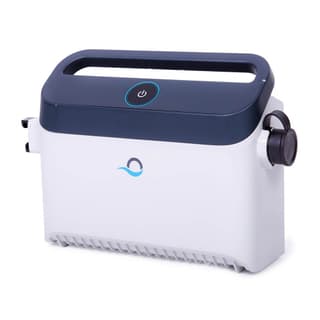
Dolphin Power Supply
$329.00 $399.00 Save 18%
The most frequently replaced part on robotic pool cleaners. If your robot is unresponsive with a good outlet — or dies when the motors load up — swap this before anything else.
View Details → Free shipping · 30-day returns
A failed drive motor is the expensive diagnosis, and it's not a DIY job — opening the sealed motor unit typically voids any remaining coverage. If your robot is under warranty, stop here: check our warranty information and contact us with the model, age, and symptoms. We're factory-authorized for the brands we sell, so claims go through us, not a call center.
Repair or replace? Let the robot's age decide
Quality robotic cleaners last 5-8 years with basic care, and that number should drive the repair-versus-replace call:
- Under 5 years: repair. Wear parts and power supplies are cheap relative to the robot, and warranty may cover the rest.
- 5-7 years: judgment call. One affordable repair is fine; a motor replacement on a robot this age rarely pencils out.
- Past 7-8 years: put the repair money toward a new robot. Filtration, navigation, and warranties have all improved dramatically, and you restart the clock with fresh coverage.
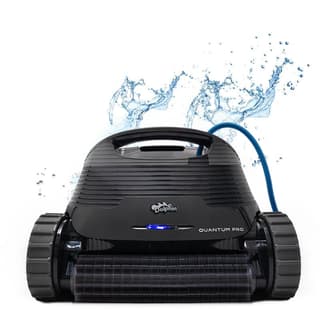
Dolphin Quantum
$1649.00
If your old robot's repair quote made you wince, this is the value flagship we point people to — full floor-to-waterline cleaning, an XXL fine filter basket, and a fresh multi-year warranty.
View Details → Free shipping · 30-day returns
Keep it moving: prevention and next steps
The bottom line
A robot that won't move is usually a robot that's blocked, not broken. Work the checks in order — power, then impeller, then filter, then tracks and brushes — and run the out-of-water test before you conclude anything is dead. The overwhelming majority of these calls end with a pebble, a hair wrap, or a filter that hadn't been rinsed in a month.
The habits that prevent the next no-move morning take minutes: empty and rinse filters after every cycle, straighten the cable weekly, pull the robot from the pool between cleanings and store it shaded on a caddy, and clear the impeller monthly if you have trees or swimmers with long hair. Our maintenance guide covers the full routine, and the troubleshooting guide is the reference for everything beyond movement.
And if today's diagnosis ended in "time for a new one," browse our ranked best robotic pool cleaners or take the 60-second Help Me Choose quiz — we'll match a robot to your exact pool, with free shipping and a full manufacturer warranty.
