Best Robotic Pool Cleaner With Remote Control: What Each App Lets You Do

None of these robots comes with a handheld remote. The remote is your phone, and what it can do differs a lot from one robot to the next.

4 ranked picks Find the right clean without paying for features you won’t use
The quick answer

Which Robot Should You Buy?

None of the robots here ships with a handheld remote, so remote control means an app. The Clear S comes closest to a true remote: its app has manual joystick driving, so you can steer the robot yourself. The Clear UV does the same and adds an app-controlled UV-C light. If you want to start, stop and schedule from your phone without steering, the Dolphin Sigma and the Dolphin Quantum do that.

On this page: the picks · side by side · questions · our advice

People looking for the best robotic pool cleaner with remote control usually picture a handheld controller with arrows that drives the robot around like a toy car. We should say at once that none of the seven robots in these guides includes one. On these robots, the remote is a phone app.

That still leaves a real choice, because the apps do different things. Two robots here let you steer by hand with an on-screen joystick. Two let you start, stop, schedule and change modes, with no steering. Three have no wireless control at all and are run from the power supply. This page ranks the four with app control, and is honest about how often you will use it.

Four App-Controlled Robots, Ranked by What You Can Command

In order, with today’s price on each.

Top Choice
Clear S Robotic Pool Cleaner
$1749 $2749 Save $1000
Buy Now: Clear S
Clear

Clear S

Closest to a True Remote: Joystick Driving

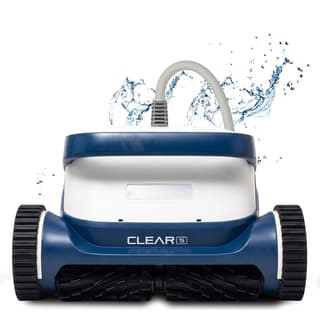
The Clear S leads because its app lets you take the wheel. Manual joystick driving in the Clear app means you can steer the robot to a patch it missed or to debris that arrived after the cycle. The app also sets weekly schedules and shows live pool temperature, and the robot has six modes: Regular, Ultra, Fast, Floor only, Waterline only and Custom. Expect to pay more than for the Quantum and less than for the Premier, and check that with the live price on the card.

Best for
In-ground pool owners who want to steer the robot themselves for spot-cleaning.
Keep in mind
Steering happens on a phone screen, not a handheld remote. The specifications we work from do not state how the app connects, so ask us if signal is a concern.
No. 2
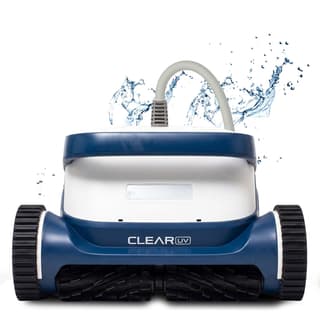
Clear UV Robotic Pool Cleaner
$1999 $2999 Save $1000
Buy Now: Clear UV
Clear

Clear UV

Joystick Driving Plus an App-Switched UV-C Light

The Clear UV has the same app and the same joystick driving as the Clear S, so as a remote-controlled robot it is the equal of our first pick. It adds one more thing to control from the phone: a built-in UV-C light. That and a higher price, close to the Premier's and below the Sigma's, are the differences. It is second because the remote-control experience is identical and the Clear S costs less. Choose it if the light is something you want in its own right.

Best for
Buyers who want manual steering and also want the UV-C light on the same app.
Keep in mind
Nothing extra for remote control over the Clear S. We make no claims about what the light does for the water.
No. 3
Dolphin Sigma Robotic Pool Cleaner with Gyroscope, Wi-Fi, Oversized Filters, & 3 Year Warranty
$2349 $2999 Save $650
Maytronics

Dolphin Sigma

App, Day-and-Time Scheduler and Siri Voice Control

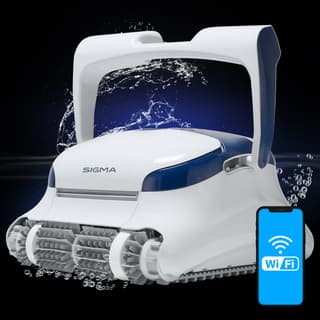
The Sigma does not offer joystick steering, and we will not suggest it does. What its myDolphin Plus app does offer is the widest set of commands among the Dolphins: a weekly scheduler by day and time, a filter alert, and Siri voice control for hands-free use. It connects over Wi-Fi and Bluetooth, which gives you a link from the house and a direct one at the poolside. Behind the app is the most heavily equipped robot here, and the highest-priced pick on the page.

Best for
Owners who want voice commands and exact schedules, and whose pool justifies a top-tier robot.
Keep in mind
No manual steering is , and it costs the most. Do not buy it expecting to drive it around.
No. 4
Dolphin Quantum Robotic Pool Cleaner
$1599
Maytronics

Dolphin Quantum

Start, Stop, Schedule and Modes for the Least Money

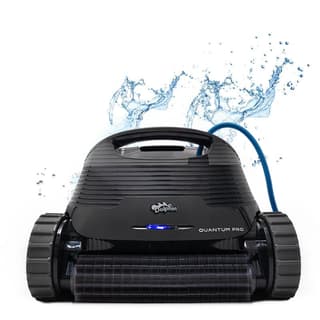
The Quantum covers the everyday remote functions at the lowest price of these four. Its myDolphin Plus app works over Wi-Fi and handles start, stop, schedules, cleaning modes and alerts. There is no joystick steering, and the app depends on your Wi-Fi reaching the power supply. As a fallback it has a weekly timer on the power supply, set to every day, every 2 days or every 3 days, which works with no phone at all. If what you want is to start a clean from the sofa, this is where to stop spending.

Best for
In-ground pool owners who want simple phone control and a timer that works without it.
Keep in mind
No manual steering and no Bluetooth . Check the Wi-Fi where the power supply will sit before relying on the app.

What Remote Control Means on a Pool Robot

  1. Steering

    Manual driving lets you point the robot at one spot: a drift of leaves in a corner, sand under the steps. Only an app with a joystick offers it, and most cleaning never needs it.

  2. Commanding

    Starting or stopping a cycle and choosing a cleaning mode from your phone saves a walk to the power supply. This is the everyday form of remote control, and it matters most when the pool is out of sight of the house.

  3. Scheduling and Alerts

    Setting days and times, and hearing when the filter is full, is remote control too. It is the part that keeps working when you are not thinking about the pool at all.

  4. The Connection Behind It

    An app is only as good as its link to the robot. Before you count on any remote feature, check how the robot connects and whether that signal reaches your pool area.

The Four App-Controlled Picks Compared

Specification Clear S Clear UV Dolphin Sigma Dolphin Quantum
Price today $1749 $1999 $2349 $1599
Cleans Floor, walls and waterline Floor, walls and waterline Floor, walls and waterline Floor, walls, waterline, sun shelves and stairs
Scheduling Weekly schedules in the Clear app Weekly schedules in the Clear app Weekly scheduler by day and time Weekly timer: every day, every 2 days or every 3 days
App Clear app (iOS and Android) Clear app (iOS and Android), with UV-C light control myDolphin Plus (Wi-Fi and Bluetooth) myDolphin Plus (Wi-Fi)
Filtration UltraFilter basket: 1-micron fine and 180-micron coarse panels UltraFilter basket: 1-micron fine and 180-micron coarse panels NanoFilters and standard filter cartridges XXL MaxBin basket with standard and NanoFilter panels
Brushes Front and rear active brushes Front and rear active brushes Quad scrubbing brushes Dual HyperBrush
Navigation Gyroscope and accelerometer Gyroscope and accelerometer SmartNav 3.0 with gyroscope SmartNav 2.0
Cable 59 ft anti-tangle 59 ft anti-tangle 55 ft with 360° anti-tangle swivel 55 ft with anti-tangle swivel
Warranty 3 years (limited) 3 years (limited) 3 years 2 years
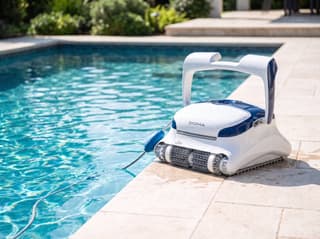
Dolphin Sigma robotic pool cleaner at the edge of an inground pool
A feature is worth paying for when your pool or your routine needs it.

What Each App Lets You Do

Here is what is published for each robot's app. Where a function does not appear in the specifications we work from, the cell says not . That is not proof it is impossible, but do not buy on the assumption that it is there.

The three robots without an app, the Premier, the Cayman and the Escape, are operated by buttons on the power supply. The Premier and the Cayman have a timer there, and the Escape can be fitted with an optional timer power supply.

RobotManual SteeringApp and ConnectionAlso Controlled From the Phone
Clear SYes, joystick drivingClear appWeekly schedules, live pool temperature
Clear UVYes, joystick drivingClear appWeekly schedules, live pool temperature, UV-C light
Dolphin SigmaNot myDolphin Plus, Wi-Fi and BluetoothDay-and-time scheduler, filter alert, Siri voice control
Dolphin QuantumNot myDolphin Plus, Wi-FiStart, stop, schedules, cleaning modes, alerts

How Often Will You Actually Steer?

Less than you expect. A robot's own navigation covers the pool in a cycle, and driving it by hand around a whole pool would be slower and less thorough than letting it work. Manual steering earns its place in a few specific moments, below.

If none of them sounds like your pool, steering is a feature you would pay for and seldom open. Starting, stopping and scheduling are the remote functions that get used every week.

  • A gust drops leaves in one corner an hour after the cycle ended.
  • Sand or dirt has collected at the foot of the steps or under a ladder.
  • Guests are arriving and you want one visible patch dealt with now.
  • You want to bring the robot to the edge where you are standing, ready to lift out.

What an App Cannot Do

A phone can tell a robot what to do. It cannot lift a wet robot out of the water or rinse the filter. It cannot make a robot clean surfaces it is not built for, and it does not stand in for the skimmer or the sanitizer.

It also depends on a connection. If your phone is flat or out of range, the robot waits. That is why we like a robot with a second way in, and the Quantum's timer on the power supply is the example on this page. If you would rather not involve a phone at all, tell us about your pool and we will point you to a robot that runs from its power supply.

Making App Control Work Smoothly

  1. Set up the app on every phone in the household that will run the pool, so control does not depend on one person being home.
  2. Use the schedule for routine cleaning and keep manual control for exceptions. A robot you must remember to start is not saving you much.
  3. When steering a Clear robot, stand where you can see it through the water and make small moves. Glare and ripples make it easy to overshoot.
  4. After a manual spot-clean, check the filter. Concentrated debris fills it faster than a normal cycle does.

Remote Control Questions

Do any of these robots come with a handheld remote?

No. None of the seven robots in our guides includes a handheld remote. Remote control is through a phone app on the Clear S, Clear UV, Sigma and Quantum. The Premier, Cayman and Escape have no app and are operated at the power supply.

Can I drive a Dolphin robot manually from my phone?

Manual steering is not for the Sigma or the Quantum, the two Dolphins here with an app. Their app handles starting, stopping, scheduling, modes and alerts. If steering by hand is what you want, the Clear S and Clear UV are the robots whose app includes joystick driving.

Can I control a pool robot with my voice?

With the Sigma, yes: Siri voice control is on its feature list, alongside the myDolphin Plus app. We do not list voice control for the other robots here. Treat it as a hands-free convenience, not a replacement for the app when you want to set schedules.

What if I do not want to use a phone at all?

Then you do not need this page's picks. The Premier is run from its power supply, with a timer for every day, every 2 days or every 3 days and a full-filter indicator. The Cayman and Escape are also operated at the power supply. The Quantum's timer works without its app, too.

Does a robotic pool cleaner with remote control clean better than one without?

No. Cleaning comes from the motors, brushes, filters and navigation, and those work the same whether a cycle is started by app, timer or button. Remote control adds convenience and, with joystick driving, the ability to spot-clean. Choose the robot for your pool first, then decide how much control you want over it.

The Verdict

Decide Whether You Want to Steer or Just to Start

Our advice: be honest about which kind of remote you would use. If you want to drive the robot to a spot yourself, buy the Clear S, and take the Clear UV only if you want its light. If you want to start, stop and schedule from your phone, the Quantum does that for the least money, and the Sigma adds voice control and Bluetooth if your pool also warrants its hardware. If none of that appeals, a robot run from its power supply will clean just as well.

Our top choice

Clear S

Closest to a True Remote: Joystick Driving

$1749 $2749
Buy Now: Clear S

Need Help Choosing?

Tell us about your pool and what keeps landing in it. Five quick answers are enough to narrow hundreds of options to a handful worth buying.

5Quick Questions
60Seconds
ZeroGuesswork