Fall Sale! Save $25 off $500 or $50 off $1000 — biggest sale of the year. Applies automatically at checkout, no code needed. · Shop the SaleFall Sale! $25 off $500 · $50 off $1000
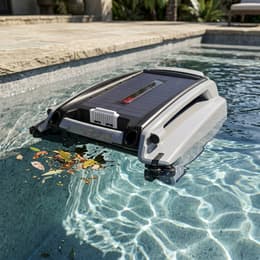
Top crystalline solar panel charges automatically in sunlight with night reserve.
Obstacle & Wall Avoidance
Infrared sensors steer smoothly around walls, steps, and floating cleaner cables.
Featherlight 9-Lb Hull
Easy one-hand lift and slide-out debris drawer cleanup.
Maytronics One App
Bluetooth status monitoring, mode tweaks, and manual edge recall.
Paddlewheel Intake
Captures leaves, blossoms, and insects before they sink to the floor.
3-Year Dealer Warranty
Maytronics dealer-channel version of the Skimmi platform.
The Bottom Line
Where the Dolphin Skimmi 300 Fits
Best For
Pools up to 65 ft needing hands-free solar surface leaf, bug, and pollen skimming.
What We’d Buy
A solar surface skimmer for leaves, bugs, and pollen. Dolphin Skimmi is the closest online match; Betta SE Plus adds backup wall charging.
Choose Solar-Only or Backup Charging
The Dolphin Skimmi 300 shares its core platform with the Dolphin Skimmi. Both are built for automatic surface debris pickup. Choose the Betta SE Plus instead if plug-in backup charging matters during long stretches of cloudy weather.
The Dolphin Skimmi 300 is a solar-powered, cordless robotic pool skimmer from Maytronics. It paddles across the water surface collecting leaves, bugs and other floating debris before they sink, and is rated for pools up to 65 ft long.
Maytronics lists a default cycle of 45 minutes, control through the Maytronics One app, a weight of 9 lb and a 3-year Maytronics warranty.
Say goodbye to the complexities of upkeep as Skimmi™ effortlessly navigates your pool with its automatic navigation algorithm and smart sensors.
Maytronics, on the Dolphin Skimmi 300
Specifications
Dolphin Skimmi 300 Specs
Cleaning
Cleaning Coverage
Water Surface
Full Filter Indicator
No
Default Cycle Time
0.75 hours
Pool Attributes
Maximum Pool Length
65 ft
Pool Shape
Rectangular, Round, Free Shape, Kidney
Size & Dimension
Robot Weight
9 lb
Package Dimensions
20.2x18.4x7.8 in
Gross Weight
11.8 lb
Other
Warranty
3 years
Specifications as published by Maytronics for product no. 9997003-US (UPC 00810071228322).
FAQ, Manuals & Parts
Dolphin Skimmi 300 FAQ & Owner Support
Frequently asked questions
Straight answers on parts, ownership, and the closest models you can order today.
Skimmi 300 vs. Dolphin Skimmi—what's the difference?
They use the same solar-skimming platform. Compare the current listings for trim, seller, included warranty, and price.
What cleaning modes does the Skimmi 300 have?
The Skimmi 300 offers multiple cleaning modes for different pool conditions:
Edge Free – Provides rapid surface skimming for quick debris removal across the pool surface. Edges are not specifically targeted in this mode.
Leaf Capture – Prioritizes large leaves and floating debris for more focused surface cleaning.
Eco Mode – Runs automatic, scheduled cleaning sessions to maintain the entire pool surface with minimal effort. There are 3 different Eco Mode options in the Skimmi 300 to adjust the cleaning/resting intervals.
Edge Cleaning – Uses Wall Wash technology to improve cleaning performance along pool edges and near the waterline, where debris tends to collect.
What is the Eco Mode on the Skimmi 300?
The Skimmi 300 offers more flexibility with Eco Mode. You can choose among three session types based on sunlight conditions and the level of cleaning your pool needs.
The default (Medium sessions) setting provides a typical combination of cleaning and rest time suitable for most environments. During the day, the robot cleans for 45 minutes, then rests in the sun for 20 minutes. At night, it automatically adjusts to longer 90-minute rest periods.
The Long session, for sunny areas, increases cleaning duration with shorter rest intervals.
The Short session, for low-sun conditions, reduces cleaning time and extends rest periods.
The Skimmi 300 automatically adjusts its Eco cycles between day and night operation.
What features are included with the Skimmi 300?
The Skimmi 300 is an advanced robotic pool skimmer designed to keep the pool surface clean and along the pool edges. It includes a large 6-liter filter basket, providing increased capacity for leaves, insects, pollen, and floating debris.
The Skimmi 300 offers four cleaning modes, including Eco Mode (with 3 different Eco mode options), and manual drive via the app for added control. Edge-Free mode focuses on the water surface without the edges. Leaves Capture mode seeks leaves but doesn’t clean the perimeter. It also features a Pick-Up function that guides the skimmer to you for easy removal. The unit connects to the app for convenient control, scheduling, and monitoring.
One of the key features of the Skimmi 300 is its wall-washing technology, which sprays water onto the pool walls and then scoops up debris. The Edge Cleaning mode enhances cleaning performance along the pool perimeter, where debris often collects.
The Skimmi 300 uses smart solar recharge technology and includes an external charger for backup charging in low-sun conditions.
Equipped with infrared sensors and algorithms, the Skimmi 300 detects walls and obstacles to move smoothly around the pool. It can operate alongside other robotic cleaners or suction systems without interference.
The Skimmi 300 is designed to provide fast, complete surface coverage for pools of various shapes and sizes, and in different seasons.
How do I set Eco Mode or other cleaning modes on the Skimmi 300?
The Eco mode is the default cleaning mode. Eco mode cleans the entire pool surface, including edges, and takes short breaks in the sun to charge.
Edge-Free mode focuses on the water surface without the edges.
Leaves Capture mode hunts for leaves but doesn’t clean the perimeter.
If you’ve selected “Edge Free” or “Leaves Capture” modes, you can return to Eco Mode with the following steps:
Open the app and tap the “>” symbol to select a cleaning mode.
Choose Eco mode or another cleaning mode.
There are 3 Eco mode options in Skimmi 300 to adjust the cleaning/resting intervals. Tap “Save” to save the new Eco mode setting.
Tap “Clean” to start cleaning.
In Eco mode, when the Skimmi is on solar-charging standby between cleaning cycles, the battery LEDs will blink green every 6 seconds.
How does the Skimmi 300 charge?
The Skimmi 200 and 300 can be charged using either the included external charger or the built-in solar charging.
Solar Charging:
Skimmi is designed to prioritize solar power. It uses its built-in solar panel to recharge in sunlight, while in use, or on standby. Charging status is displayed in the app. The robot also features an energy sensor that helps it detect the sunniest area of the pool to maximize solar charging.
External Charger:
When connected to the charger, the LEDs will blink to show the battery level while charging. Each battery level lights up as it charges; when fully charged, all LEDs illuminate and then turn off. This is the recommended method for a full charge on cloudy days.
On cloudy days, during winter, or when sunlight is limited, you can use the external charger to ensure uninterrupted performance. This allows Skimmi to continue operating even when solar conditions are not ideal.
Troubleshooting the Dolphin Skimmi 300
Maytronics' own fixes for the problems owners report most, followed by the symptom table from the user manual.
How do I replace the front paddlewheel on the Skimmi 300?
Rotate the front wheel to the correct angle and pull it out.
If needed, replace the connectors by removing the larger connector and the smaller connector, then install the new connectors.
Insert the front wheel by first aligning the wheel with the smaller connector, then pressing the other side into the larger connector until it clicks into place and rotates smoothly.
Reinstall the filter tray.
The paddlewheels on my Skimmi 300 are stuck — how do I clean them?
Remove the Skimmi from the pool.
Turn the Skimmi upside down.
Make sure the filter tray is fully inserted and snaps into place.
Rotate the side and front wheels to check for debris. Check for hair, leaves, or any objects that may be stuck, and remove anything that could be blocking movement with tweezers or needle-nose pliers.
The Skimmi™ is in a sunny location, but it isn't charging
This can occur when the battery is full so that the skimmer runs on solar power instead of battery. When the sunlight becomes weaker, the battery will start to power the skimmer again and will continue charging.
Ensure the Skimmi is exposed to direct sunlight to let the battery recharge. Cold weather and cloudy skies may impact the charging ability.
If the SKIMMI won’t charge, please open the app and note the charging strength.
If the charging strength is below 5 Watts, please check for possible limescale residue accumulation on top of the solar panel. In such a case, please gently clean the residue off using diluted citric acid or vinegar.
If the charging strength is above 5 Watts, but the SKIMMI won't accumulate charge, it may indicate a faulty battery.
Important: The robot is a solar-powered model. Sufficient solar power and direct sunlight are required for proper charging and operation.
Still need assistance? Click the blue chat icon in the bottom-right corner of your screen to start a conversation with our AI agent — 'Phin'!
The Skimmi™ movement is jerky and/or making noise
This can happen if the water is full of debris or if there is very strong wind, making it difficult for the Skimmi to navigate properly.
Try the following troubleshooting steps:
In the app turn "Smart Detect" to OFF.
In the "Smart Detect" function, select a lower water quality or switch the function OFF.
Turn "Smart Detect" to OFF.
Empty the filter tray and wash with a stream of water.
If the front brush is making a strange, squeaking noise or assistance is still needed? Click the blue chat icon in the bottom-right corner of your screen to start a conversation with our AI agent — 'Phin'!
The Skimmi™ often stands still, and cleaning time is reduced
If you often find the Skimmi standing still, and the cleaning time is less than usual, try the following steps:
In the MyDolphinSkimmi app, reduce the length of Day Cleaning and extend the Day Pauses in 'Device Settings'.
Still need assistance? Click the blue chat icon in the bottom-right corner of your screen to start a conversation with our AI agent — 'Phin'!
The front paddlewheel is jammed on my Skimmi™ - How do I clean it?
Here are the steps to follow:
Make sure the Skimmi is turned off and remove it from the pool.
Remove any debris from the paddlewheel.
Empty the filter tray and rinse it thoroughly to remove any remaining debris.
If this continues to happen even after completing the troubleshooting steps, open the app and set 'Wheels Unblock' to 'Forced'.
Please note that this option increases the skimmer's power consumption, which can potentially reduce the overall cleaning time. However, it ensures the wheels can move freely. Once there is less debris in the pool, change the setting back to Auto.
Still need assistance? Click the blue chat icon in the bottom-right corner of your screen to start a conversation with our AI agent — 'Phin'!
Symptom
Possible reason
What to do
Robot can't be switched ON. Green pause LED is not lit or blinking
• Battery is not charged.
• Charge the robot - Plug the charger into the port under the robot or place the robot in direct sunlight.
Robot doesn't start cleaning. Battery indication is low or OFF. App says battery is low.
• Battery is too low.
• Plug the external charger into the port under the robot or place the robot in direct sunlight and let the battery recharge.
Robot does not move.
• Cleaning has not started (green indication LED constantly ON). • Robot is on a pause between cleanings (green pause LED single-blinks every 6 seconds). • Battery is low (green LED blinks. • New app update failed (green pause LED is constantly blinking).
• Open the app and tap the Start button. • Wait until the next cleaning cycle starts if the status bar in the app shows that it is in a recharge pause. • Connect the cable to the port under the robot or wait for the battery to charge in the sun. • Open the app and complete the robot’s software update.
Robot has stopped moving, it gives a red error signal .
• There is an object stuck in one of the wheels of the robot.
• Remove the object or hair. If it's the front wheel, you can remove and clean it. If it still doesn't work, contact Customer Care: wecare@maytronics.com
Robot often stands still, the cleaning time has been significantly reduced.
• Cloudy skies, low sunny intensity for a long time. • Decreased battery capacity.
• Tap the cleaning mode box in the app home screen, select the short sessions option. Or, charge the robot with the cable. • Contact Customer Care to replace the battery: wecare@maytronics.com
Robot turns only in circles.
• Sensor covers are dirty. • Salt in the pool is not perfectly dissolved, the water is polluted. • Water's gotten into the robot.
• Wipe off dirt with a damp cloth. • Open the app and select a lower water quality in the "Smart Detect" function or turn the function OFF. • Contact Customer Care: wecare@maytronics.com
Robot does not collect debris in the filter tray, it pushes small objects in front of it.
• Non-return flap is stuck or has been incorrectly installed. • Filter tray is full.
• Check if the non-return flap of the filter tray is connected properly. See the illustration below. • Empty the filter tray and wash it with a stream of water.
A paddle wheel often jams when moving. Red alert indicator.
• Hair or another object is wrapped around the shaft, reducing the strength of the wheel. • Filter tray is full. • Low strength of motors.
• Remove unwanted hair or other object. • Empty the filter tray and rinse it.
From the Dolphin Skimmi 300 user manual's troubleshooting table.